TABLE OF CONTENTS
- Participant Portal
- What’s New in the Data Exchange Services API
- Webhooks: two events when a transaction is canceled
- Publication statuses for themes
- Provider transactions: more complete filters
- New file formats available for data offerings
- Rounded prices for currencies without decimals
- Limit the sharing of sensitive data in conversations
Participant Portal
What’s New in the Data Exchange Services API
Manage your organization’s roles
The Organisation Authorization Management API allows to:
- list and view the roles available in the organization,
- add or remove a role to a member or a service account,
- define the roles assigned by default to new members of the organization.
Manage the user lifecycle
The User Accounts API lets you deactivate, reactivate and delete the users of your organization. Upon deactivation, the resources and roles of the main contact are transferred to the specified new main contact.
Webhooks: two events when a transaction is canceled
Two new events are available in the event selector:
- Acquirer transaction canceled, in the Acquirer transaction section: sent to the acquirer organization when the acquirer abandons the acquisition before the end of the process, when the license signature is declined, or when the payment is declined or canceled.
- Provider transaction canceled, in the Provider transaction section: sent to the provider organization in the same cases, for a transaction on one of its data offerings.
Each notification contains the IDs of the transaction, the provider and acquirer organizations and the data offering.
Publication statuses for themes
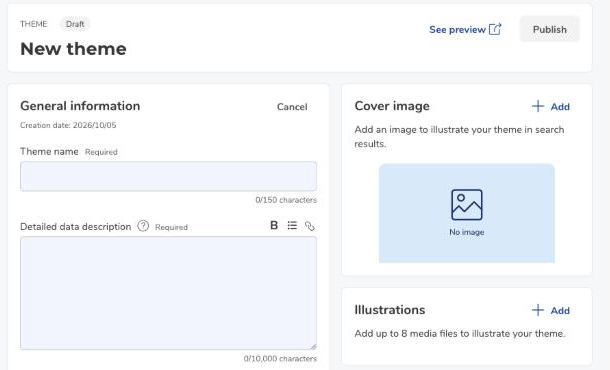
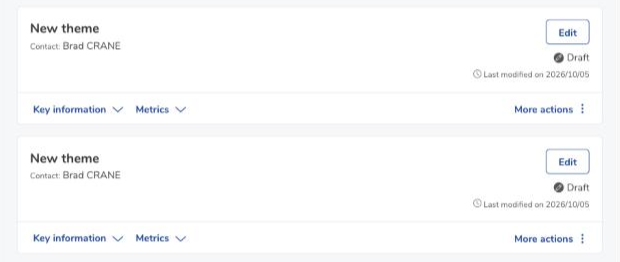
Themes have three publication statuses: Draft, Ready to publish and Published.
- Draft: every new theme is created with this status. It can be saved and previewed at any time, even if the required fields are not completed.
- Ready to publish: the required fields (theme name and detailed data description) are filled in and the Publish button is enabled.
- Published: the theme is published and visible in the search engine. The Unpublish button sets it back to Ready to publish.
Statuses are displayed in the header of the theme submission page and in the list of themes in the Publication universe.

Provider transactions: more complete filters
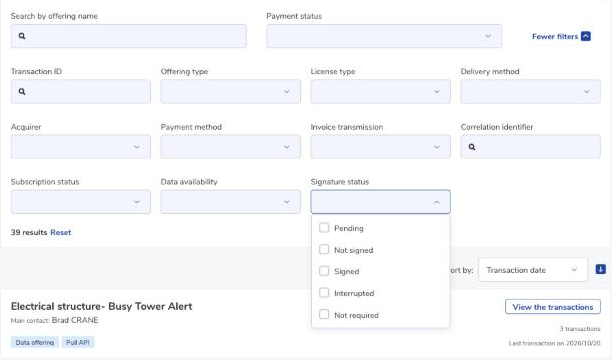
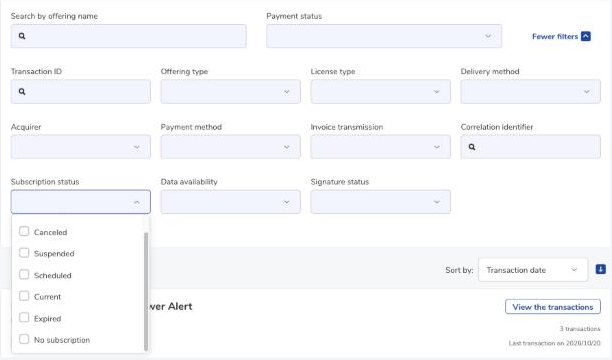
In Provider transactions, you can filter all displayed transactions with two new values:
- Not required in the Signature status filter,
- No subscription in the Subscription status filter.
New file formats available for data offerings
To meet user needs, data providers can add files in the following formats: .CSR, .CRT, .MSG, .PEM, and .XLSB.
Rounded prices for currencies without decimals
For currencies that do not support decimals (yen, won), prices calculated by the Participant Portal are rounded:
- Percentage discounted price: rounded to the nearest unit. This is the amount paid by the data acquirer.
- Price per request of a volume-based API data offering: displayed with at most two more decimals than the currency supports, i.e. 2 decimals for the yen and the won.
Limit the sharing of sensitive data in conversations
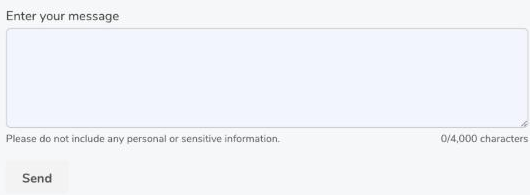
Below the message fields of the data offering access request, the acquisition request and the inbox reply area, the notice “Please do not include any personal or sensitive information.” reminds users not to share personal data.
Was this article helpful?
That’s Great!
Thank you for your feedback
Sorry! We couldn't be helpful
Thank you for your feedback
Feedback sent
We appreciate your effort and will try to fix the article